One keyboard.
Every machine.
Share your keyboard, mouse and clipboard across any number of computers on your local network. Control follows your cursor as it crosses screen edges — zero friction.
Core Features
Built for multi-machine workflows
EtherWaver runs entirely on your local network — no cloud, no accounts, no latency overhead.
Screen-edge switching
Move your cursor to the edge of any screen and it teleports to the next machine. Completely seamless.
Shared keyboard & mouse
One physical input pair. Any number of machines. Hotkeys and scroll events pass through correctly.
Local network only
Zero cloud infrastructure. All traffic stays on your LAN — perfect for security-conscious environments.
Low latency
Direct LAN routing with no relay servers means input delay is imperceptible even on Gigabit networks.
Clipboard sync
Copy on Machine A, paste on Machine B. Works with text, image data, and file references.
Unlimited machines
Connect two computers or twenty. Topology is fully configurable — linear, grid, or custom layout.
Setup
Running in three steps
No drivers. No reboots. EtherWaver runs as a background service and just works.
Install on every machine
Download and run EtherWaver on each computer you want to connect. Windows, macOS, and Linux are all supported with a single installer.
Designate the host
One machine runs as the server — this is where your physical keyboard and mouse are connected. All other machines register as clients.
Arrange your screens
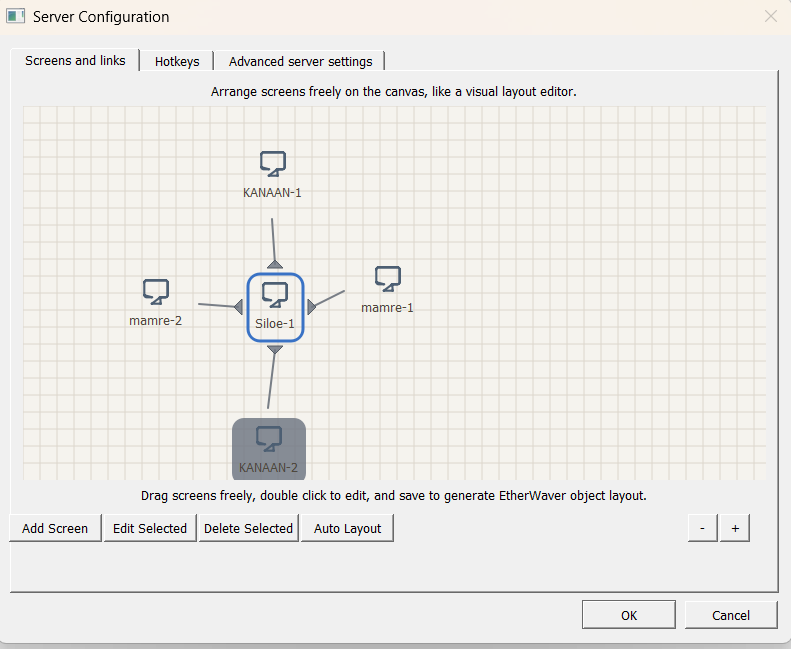
Drag screens in the EtherWaver panel to match your physical setup. Control flows naturally as your cursor crosses the configured edges.
Compatibility